

Description
Download 3 Category Expense Manager APK – Expense Tracker, Budget Planner, Financial Organizer
Overview
The 3 Category Expense Manager is a streamlined Android application designed to simplify personal finance management through a three-tier categorization system: necessary, unnecessary, and profitable expenses. Developed by TAKAOS, this free tool serves as both a household account book and an expense record keeper, enabling users to track spending with minimal complexity. The app addresses common financial challenges such as overspending, lack of budget visibility, and poor expense prioritization by introducing a structured approach to money management. It is particularly suited for students, young adults, and individuals seeking to develop healthier financial habits without the complexity of full-featured accounting software.
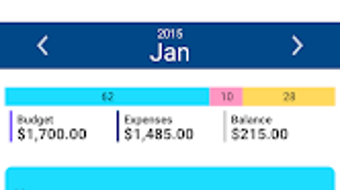
Users can set a monthly budget and define ideal ratios for each category, allowing the app to automatically calculate allowable spending limits and track remaining balances. This feature promotes intentional spending by highlighting how much of the budget remains within each category. Real-world usage scenarios include daily expense logging, monitoring discretionary spending, and adjusting financial behavior based on visual feedback. The app supports income tracking, fixed cost registration, and entry of minor expense items, making it a versatile tool for personal financial oversight. A home screen widget enables quick access for fast input, enhancing usability for on-the-go users.
Key Features & Capabilities
- Three-Category Expense Tracking – Organizes spending into necessary (essential), unnecessary (discretionary), and profitable (income-generating) categories, encouraging mindful financial decisions.
- Customizable Budget Ratios – Users can define ideal percentage distributions across the three categories and adjust them at any time to reflect changing financial goals.
- Monthly Budget Management – Allows setting a total monthly budget, with automatic calculation of individual category limits based on the defined ratios.
- Real-Time Budget Monitoring – Displays remaining budget amounts for each category after each entry, helping users stay within planned limits.
- Income and Fixed Cost Registration – Supports tracking of earnings and recurring expenses, offering a more comprehensive view of financial health.
- Minor Category Expense Entries – Enables detailed logging of smaller transactions under broader categories for better record accuracy.
- Widget Integration – A home screen widget allows instant access to input expenses without opening the full app, improving workflow efficiency.
- Data Backup Options – Supports cloud backup via Google Drive or Dropbox, ensuring data preservation across devices or after device replacement.
These features collectively support users in maintaining financial discipline. For example, a student can use the app to monitor daily food and transportation costs (necessary), entertainment spending (unnecessary), and freelance income (profitable). By observing real-time balances, they can adjust their behavior to align with financial goals. The ability to modify ratios empowers users to experiment with different spending strategies, such as reducing unnecessary expenses to increase savings or investment allocation.
User Interface, Workflow & Performance
The user interface of 3 Category Expense Manager is designed with simplicity and functionality in mind. Navigation is straightforward, with a clear layout that prioritizes essential actions such as adding expenses, viewing category balances, and adjusting settings. The main screen likely presents a visual summary of budget usage across the three categories, possibly using color-coded indicators or progress bars for immediate comprehension.
Workflow efficiency is enhanced by the home screen widget, which allows users to log expenses with minimal taps. The process of entering a new expense involves selecting a category and inputting the amount, with the app automatically updating the remaining budget. This streamlined process reduces friction and encourages consistent usage. The app likely supports quick access to recent entries and provides a history view for reviewing past transactions.
Performance details were not specified by the developer. However, based on the app’s lightweight nature and focus on core functionality, it is expected to operate smoothly on modern Android devices. The developer did not provide additional system requirements or resource usage data. General software behavior patterns suggest stable operation under normal usage conditions, with minimal impact on CPU or RAM during typical interactions.
Compatibility & System Requirements
The 3 Category Expense Manager is designed for Android devices and is available as an APK file, allowing installation on a wide range of smartphones and tablets. The app is compatible with Android operating systems, though the specific version range was not provided. Installation size information is also not available.
Exact system requirements were not listed. The developer did not specify minimum CPU, RAM, or storage thresholds. Compatibility with older Android versions cannot be confirmed. Users should ensure their device supports APK installation, which typically requires enabling “Unknown Sources” in the security settings. The app’s reliance on Google Drive and Dropbox for backup implies that access to these services is necessary for full functionality.
Pros and Cons
Pros
- Simple, intuitive interface ideal for beginners and non-technical users.
- Three-category system promotes thoughtful spending habits.
- Customizable budget ratios allow flexible financial planning.
- Real-time budget tracking helps users stay within limits.
- Home screen widget enables quick expense logging.
- Supports income tracking and fixed cost registration.
- Cloud backup via Google Drive and Dropbox ensures data safety.
- Completely free to download and use with no in-app purchases.
Cons
- Limited to Android platform; no desktop or iOS version available.
- Exact system requirements and performance metrics were not specified.
- App functionality depends on third-party cloud services for backup.
- Limited customization of categories or subcategories.
- No built-in reporting or analytics beyond basic budget tracking.
FAQ Section
Is 3 Category Expense Manager available for iOS?
The app is currently available only as an APK for Android devices. There is no official iOS version or app store listing.
Can I use this app offline?
Yes, the app supports offline usage for logging expenses, viewing budgets, and managing data. However, cloud backup features require an internet connection.
Is the app safe to download and use?
As a free app developed by TAKAOS, it does not require excessive permissions. Users should only install APKs from trusted sources. The app’s reliance on Google Drive and Dropbox for backup is standard and secure when used with official accounts.
How often should I update the app?
Users should check for updates periodically to ensure access to the latest features and security patches. Updates are recommended when available through official channels.
What happens if I lose my phone?
If you have enabled cloud backup via Google Drive or Dropbox, your data will be preserved and can be restored on a new device. It is advised to verify backup status regularly.
Final Thoughts + CTA
The 3 Category Expense Manager stands out as a focused, user-friendly tool for individuals seeking to gain control over their finances through structured budgeting. Its three-tier categorization system offers a fresh perspective on spending, encouraging users to think critically about the purpose of every dollar. The combination of customizable ratios, real-time tracking, and cloud backup makes it a reliable companion for daily financial management.
While it lacks advanced reporting and cross-platform availability, its simplicity and free access make it highly accessible. It is especially beneficial for students, young professionals, and budget-conscious users who value clarity over complexity. For those looking to improve financial discipline without overwhelming features, this app delivers a meaningful solution.
Download 3 Category Expense Manager APK now and take the first step toward smarter, more intentional spending.
Guides & Tutorials for 3 Category Expense Manager APK
How to install 3 Category Expense Manager APK
- Click the Preview / Download button above.
- Once redirected, accept the terms and click Install.
- Wait for the 3 Category Expense Manager APK download to finish on your device.
How to use 3 Category Expense Manager APK
This software is primarily used for its core features described above. Open the app after installation to explore its capabilities.
User Reviews for 3 Category Expense Manager APK 0
No reviews found





